Jeff Duntemann's Contrapositive Diary Rotating Header Image

The Terror of Maturity

No, not the maturity of people. Nor pets. I’m talking about an industry, one I’ve followed all of my adult life: personal computing.

Yes, personal computing is mature. This doesn’t mean that there’s no further progress to be made in advancing the technology. What it means is that for the majority of people, damn near any modern computer will meet their needs, from the standpoint of both hardware and software. This fact scares the living hell out of the major industry players.

This is not some sort of sudden industry earthquake. It’s a slow, gradual process that draws in more and more people as the state of the art improves and becomes everything they need. I have a friend who still uses Office 97, and another who still uses Office 2000. I myself stuck with Office 2000 until 2010 or so. Why? It did everything I needed. I bought Office 2007 for its ability to add comments to documents, and later looked at Office 2013, but I see nothing there that I need and don’t have. I paid a box shop to build me a Win 7 quadcore tower in 2011 that was my primary desktop machine until it started getting flaky in 2023. I bought a name-brand 8-core mini-tower running Win10, and scrapped the quadcore. As I’ve mentioned here on Contra, I recently bought a 10-core Win11 Dell machine when updates for Win 10 were scheduled to end.

It’s unclear whether Microsoft made Windows 11 incompatible with older hardware to force hardware upgrades; after all, Microsoft does not sell computers. They can force existing Windows users to upgrade the OS by dropping security fixes for the older release. And they can sell current Windows installs to the makers of ready-to-run computers, by fiat. So to some extent, Windows can force upgrades.

This is less true of application software providers. I learned page layout on Adobe InDesign 1.0, way back in the ‘90s. I bought each upgrade through Creative Suite 2, and I’m still running CS2. Newer versions will export ebook layouts, but I’ve already got Jutoh, a dedicated ebook layout package, which does everything newer InDesign versions do regarding ebooks, and more.

I’ll buy software upgrades when they provide something new or better than what I already have. What I won’t buy is software as a service (SAAS) which is basically a magazine subscription for your software. You can keep using it only as long as you keep paying for it, forever. Microsoft and Adobe have SAAS applications. No sale. There are MS Office lookalikes, and if Adobe does something stupid and remotely disables my copy of CS2, there is Affinity, now owned by Canva and currently available for…free. Affinity is offered by Canva as a front end for Canva, and can also do graphics design and photo editing, making it a peer of Adobe’s Creative Suite. Sure, Adobe offers more apps in its suite. But…do you really need all that other stuff?

Then there’s the issue of software upgrades that mostly sell other stuff. A lot of people are starting to wonder if the primary purpose of Windows 11 is to sell people on cloud-based storage and other online things, which are SAAS and (as far as I’m concerned) an immense privacy risk.

Game software (at least the puzzle games that I use) approximate SAAS by forcing you to watch an ad before each game, or at some game juncture. The Wordscapes crossword game offers ad-free play for a price, and for a set period of time. When that runs out, the ads begin again, until you fork over more cash. After playing it and enjoying it despite its ads, I paid for Nut Sort, a color-key variation on the Towers of Hanoi game, and no longer have to watch ads before each new game. However, if you want to tweak the game by adding another bolt, you must watch an ad before you get the bolt.

Both games have what I consider a fatal flaw: If for whatever reason the games’ providers can’t push down an ad…the game stops. Mercifully, it doesn’t happen often. If it happened more often I’d say the hell with them and uninstall their games. The providers are punishing game players for something the game players have absolutely no control over; that is, no one buying ads the game providers can show to players.

Summing up: In times past, people bought new computers and new software versions fairly often, because the technology was getting better at a furious pace. This is still true to an extent for smartphones and tablets, and the more people use their smartphones, the oftener they’ll buy newer and more feature-rich models. I use mine for phone calls, by and large, along with with weather radar and a small handful of other things used only occasionally. My tablets are mostly ebook readers.

I’m not spending a great deal of money on hardware and software anymore. I’m not alone, and the industry is terrified of us. I’ve not even touched on open-source software like Linux, to which a lot of people are moving in the wake of Win 11. If they weren’t afraid of it in the 1990s, they are damned well afraid of it now. Will that fear change their business models? Probably not.

Let’s watch.
Odd Lots

  • This (scary) item is the most significant I’ve seen recently: Microsoft is working on features that obsess with granting a Windows AI its own private workspace on your machine, plus access to your Documents, Downloads, Desktop, Videos, and Music folders. This will go nowhere good. Keep it in mind, and if MS asks for permission to enable this feature, weigh the consequences. MS admits the damned thing could install malware and have hallucinations. Huh. I won’t use a computer that thinks I‘m dead.
  • There’s a cool group on Facebook called Old Radio Garage. Lots of pictures of  tube-era radios, including a few on the bench being repaired, but not a lot of discussion.
  • Speaking of radio, I (finally) took a closer look at AccuRadio, which is a free music streaming service that offers bits’n’pieces of almost everything musical. It takes a little study to find your preferences, but I was amazed at the breadth of coverage. You have to create a free account to avoid most commercials and have access to some features, but I think it’s worth the benefits.
  • Google is evidently in the process of merging Android with ChromeOS into an OS called Aluminium. (No, I didn’t misspell that. It’s the British spelling.) The Aluminium OS will evidently have AI all over itself, inside and outside. Gosh, I just can’t wait to pass on it!
  • We have AA, AAA, C, and D batteries. Why not B batteries? Reader’s Digest has a short-form explanation. What they don’t emphasize is that B batteries providing high-ish DC voltage to portable tube radios never had a standard size, not that I’ve ever heard of. I bought a 45-volt battery when I was 12 or 13 for a tube radio I was building, and it was like a long 9V battery, with the same power connectors, just more cells stacked up inside the rectangular case. I later saw all sorts of “B” batteries (most of them dead) in many shapes and voltages. Given the broad range of radios that would use it, a standard size and voltage would be impossible, which in truth explains all that needs explaining.
  • Lazarus v4.4 is out. Built with Free Pascal 3.2.2. It’s a bugfix release, but hey, there’s no reason not be up to date. It’s worked great on my several Lazarus projects under Windows 11.
  • I used to call Free Pascal FreePascal, but that’s no longer how the product’s creators spell it. Free Pascal it is. Sooner or later I’ll update FreePascal from Square One to reflect that spelling.
  • And least but not last (ok. both least and last) Politico posted a gigantic, high-fat article about a crew called Stardust who want to make chemtrails real, in essence squirting air pollution back into the atmosphere to reflect sunlight and cool the planet. This is not a new idea, and not necessary, especially since Stardust refuses to say what the particulates they want to squirt into the atmosphere are made of. There is no climate crisis. Polluting the atmosphere with unknown crap is a scam. Don’t fall for it.

A(nother) New Release of FreePascal from Square One

Here’s the link to the book’s new PDF I exported this morning, including a number of repaired typos and other fixed minor glitches:

http://www.contrapositivediary.com/wp-content/uploads/2025/11/FreePascalFromSquareOne-11-11-2025.pdf

There’s a weirdness here that I still don’t fully understand. If anybody out there can explain this to me, I would be tremendously thankful.

Ok. The release of 10-21-2025 was 20.2 MB in size. The release before that, from 9-13-2025, was 5.7 MB. I was in a rush to get the 10-21 release uploaded, and didn’t stop to look at file sizes. My bad. I live a fullish life and sometimes I move too fast.

I don’t claim to be an expert on PDF internals, so I did some digging around in the document properties for the 10-21 PDF. In the Document Properties there’s a button to bring up something called “Audit Space Usage.” This lists all the various components of a PDF, including images, fonts, and so on, with percentages of the file taken up by each component. The “Structure Info” component took up 70% of the PDF. I didn’t find anything useful about the Structure Info component online, and don’t really understand what it refers to or how it got into the PDF. The PDF I exported this morning has zero space in the Structure Info line.

It has nothing to do with it being a tagged or untagged PDF. (I tested that. Tagging adds a little bulk—just not 300%!) In truth I still don’t know why the 10-21-2025 issue is so huge. Some switch somewhere must turn on Structure Info, but I haven’t found that switch yet, and must have hit it accidentally before I exported the 10-21 PDF.

Many thanks to reader Robert Riebisch for alerting me to the oversize file!

An HT for the Price of Two Hamburgers

I got my Novice ham license in May 1973, my General a year or so later, and my Advanced a few months after that. Now that Morse Code is no longer a requirement, I’ll go for the Extra one of these months/years. I never much liked Morse Code, even though I used it tolerably well as a Novice. This is interesting; my father was a radio operator in WWII, and he worked Morse and occasionally AM into a big hulking Hallicrafters BC-610. He taught Morse to me, and to the boy scouts in Troop 926 back in Chicago in the early-mid 1960s.

After I got my General I wanted a handheld FM transceiver for the 2 meter band. Note that we never called them “walkie talkies” in ham circles. They were “handhelds” “handie talkies” or more often simply “HTs.” So I bought a Standard handheld, and later added a keypad to it so I could control my robot Cosmo with touchtones. The Standard was built like a tank and served me well for quite a few years after I bought it in (IIRC) 1975. It wasn’t cheap in its era; I’m recalling something like $300. I bought an Icom 02-AT at the Dayton Hamvention in 1986, and gave the Standard to my late and much-missed friend George Ewing WA8WTE. The 02-AT served me well until the early oughts, when it just died. At the next Scottsdale Hamfest (alas, RIP) I bought another old (and cheap) Standard, but it only had crystals for repeaters, nothing local, and no pair for simplex. So it sat in a box, and in truth, I no longer remember if I even still have it, or if not, where it went.

Some time about 1998 or so, I first heard of the Family Radio Service (FRS) which the FCC established in 1996. FRS radios were cheap, small, popular, and did not require licenses. I bought one, a Tekk TF-460, which put out half a watt on one channel. I remember going up on the roof deck here in Arizona on Christmas Day 1998, and listened to the local kids playing around with their stocking-stuffer HTs. The FRS is a slightly shrunken version of the General Mobile Radio Service, which has been around for a much longer time. The services share the same channel assignments, and GMRS users may talk to FRS users. FRS radios may now put out two watts on 15 channels, the rest being limited to half a watt.

Which brings us up to 2015. I didn’t do a lot of VHF/UHF hamming in Colorado, and what I did was on a 2M/440Mhz mobile unit I got for cheap from a friend whose ham radio father had died. Then I heard about the Baofeng handhelds being sold on Amazon. I bought a UV-82L, which puts out 5 watts FM. It has 128 slots for channels, of which I set several on the ham bands and several on the FRS/GMRS frequencies. (I applied for and got a GMRS license, WRKT221, in 2021, for $35.) I wouldn’t bother doing an entry on it here but for one thing: The UV-82L cost me $37.99 in 2015. Today, you can get a similar but better radio, the UV-82HP on Amazon for…$19.99. It puts out 8W and has storage for 200 channels.

A few months later in 2015 I bought another Baofeng HT, the 5W BF-888s. It cost me $15.86. It has 16 channels and only works on UHF, in the ~440-470MHz area. It covers FRS and GMRS and the 440MHz ham band, though it comes preset to 16 of the FRS channels. I set several channels for 440MHz ham band. FRS and GMRS now mostly work on the same frequencies, so the unit works on GMRS as well.

Alas, you can’t get one anymore. Sorry; I meant you can’t buy them one at a time. Baofeng sells them in matched sets, the smallest of which is 2 units. (I’ve seen packs of 3, 4, 6, and 20, all on Amazon.) The sets include a charger for each radio plus a plug-in speaker/mic for each. The cost for the set of two is…$18.54. That’s 9 bucks per radio, less if you subtract out the charger and speaker/mic. You can’t always buy two hamburgers for that little.

All modern Baofeng radios use lithium-ion batteries. NiCads are history.

Setting up channels on Baofeng radios is done with a free Windows app called CHIRP, which can download a radio’s current channel settings, edit them, and them upload them back to the radio. This requires a USB-to-radio cable, which costs damn near as much as one of the BF-888s units.

There was (or maybe is) some friction between Baofeng and the FCC, since its radios are not type accepted for FRS or GMRS. That was the case in 2015, and I don’t see any indication that the problem has been solved.

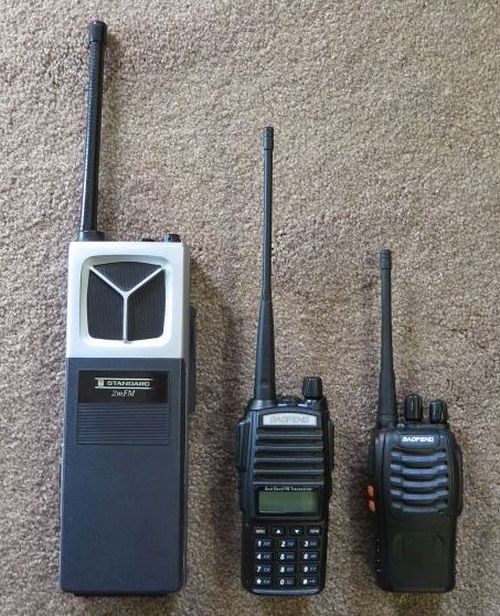
In summary, handheld radio history is moving in this direction: Handhelds are getting cheaper, smaller, and more powerful. Note the photo below, which shows the 1970s Standard crystal-controlled 5-channel HT, the UV-82L, and the BF-888s.

3 HTs - 500 Wide

I bring this up simply because it’s now cheap to get into ham radio, and Morse code is no longer required. With FRS and GMRS you can get most of the same utility in a handheld without even having an amateur radio license. (FRS does not allow repeaters.)

And if you’re not interested in hamming, radios like these are good for camping, hiking, conventions and other events, etc.

I’d be curious to know if anyone else has used inexpensive handheld radios like these (Baofeng is by no means the only manufacturer) and how well they’ve worked out for you.

Odd Lots

  • I stumbled onto the site https://thegrokipedias.com/ and although everything it says seems to support Grokpedia, there’s no indication that it’s a property or project of X or Musk himself. Then again, Grokipedia’s UI is so sparse that maybe Musk had his people create a support site that will not be updated as often as the very much in-progress Grokipedia v0.1 will be.
  • Or (scratches his head here) did Musk just tell Grok to “create a support site for Grokipedia?” We don’t know yet, and Musk being Musk, I wonder if we’ll ever know.
  • While we’re still talking Halloween, here’s a picture someone sent me of what I consider the best Halloween costume of all time. No, it’s not AI. Look carefully:
    Rocketkid
  • Ok, still Halloweenish: A food site explores the science behind…candy corn: https://www.seriouseats.com/candy-corn-science-11838045
  • One more. Just one more, promise! Here’s a candy engineer (a WHAT??) explaining the science behind…Snickers bars.
  • After coming to some sort of confidential settlement with various publisher groups, the lawsuits are over. Yet Internet Archive still offers Byte Magazine in PDF format from 1975 (when they first published) to 1998. Now, the PDFs are yuge: I downloaded May 1980, in which I had an article on the COSMAC CPU, and it was 221MB all by its lonesome.
  • Here’s another upbeat, not manic but still admirably energetic piece of classical music: Janacek’s Lachian Dance #2: “Blessed.”
  • Manic you want? They don’t come any manicker than Vaughan Williams’ The Running Set. I’ve linked to the piece before. It’s one of my all-time favorites. I characterize it “as an Irish jig on meth.”
  • I just discovered AccuRadio, and it may be a forerunner of what might be the future of radio: A free streaming service with music divided into hundreds of channels. Their classical channels are a little sparse (search failed to find Ralph Vaughan Williams or Doreen Carwithen) but the pop channels—it’s all there.
  • Daylight Savings Time has run its course for this fall/winter/spring and the nation is back on Standard Time—including Arizona, which never left Standard Time and hasn’t for…a long time. Recent research shows that most Americans would prefer to stay on Standard Time year-round. It’s 47% opposed, 12% in favor, and 40% “neutral,” which I suspect simply means they don’t care. Computers and phones get their time off servers. It’s just the battery operated ticktockers and appliance digitals that have to be set forward and back. (We have a fair number of those and are glad they don’t need fussing twice a year.)
  • I’ve always wondered about this: Why are the floors of buildings called “stories?” Good quick explanation here. We live in a one-floor house, and the ground level is not called a “story.” (I have to get my stories elsewhere…)

Grokipedia V0.1

No matter what else you might say about him, Elon Musk has the power to make *big* things happen: Tesla, Boring Company, SpaceX, Grok (more on which below) and now…Grokipedia. I didn’t list X because he didn’t create it; he just wrote checks.

If you recall, I started playing around with Grok earlier this year. My entry for March 28 shows a number of Grok replies when I asked, “Who is —-?” I asked about Carol, and my late godmother, Kathleen Duntemann 1920-1999. I asked about my sister, Gretchen Roper, but there is in fact another Gretchen Roper, who is a famous clarinetist. That exercise made me glad my last name isn’t Smith. Then I asked about…me. Who is Jeff Duntemann? You can read its reply here.

Fortunately for all of us, I’m not dead. I’m working hard on staying that way. The good news is that Grok is improving, and delivering fewer hallucinations than it was 7 or 8 months ago.

And now—ta daaa!—we have Grokipedia. It’s only a few days old and still at V0.1, so I won’t be too hard on it. As best I can tell, it’s a Grok-ish AI front end for a Wikipedia-ish encyclopedia. Musk claims he’s trying to remove political bias from Wikipedia’s articles that touch on politics. (Good luck with that, pilgrim.) On the other hand, he generally gets what he asks for and pays for.

Grokipedia’s home page displays a counter of its articles. As of a few minutes ago, it was 885,279. It also allows you to display Grokipedia screens in either light or dark mode. Some people like dark mode. I’ve seen too much typing paper in my life to abandon light mode, even  though I spent years with text monitors painting ASCII and PC-specific glyphs on a black background. For my first round of tests, I just entered random names and concepts to see what Grokipedia would do. As I pretty much expected, the majority of its articles have a disclaimer at the bottom stating that the article was adapted from one on Wikipedia. This is legal; Musk could have grabbed the whole damn thing if he wanted to, and unless I misrecall, Wikipedia has about seven million articles in its catalog.

I’ll be watching the Grok article counter going forward. I can almost hear some major crunching in the background.

Not all articles were cloned from Wikipedia. The article on the Polish National Catholic Church has no disclaimer. Wikipedia has an article, but it’s shorter and less detailed than Grokipedia’s. What Grokipedia lacks are photos. This was a pattern I saw looking things up on Grokipedia: There are no photos, even on articles cloned from Wikipedia that do have photos. (See both sites’ articles on the Russian dish ‘pelmeni.’ Several photos on Wiki; none on Groki.)

My guess is that this is a V0.1 problem and they’re still working on machinery for grabbing photos from Wikipedia or other sources. The Grokipedia articles are very plain, and don’t have a summary box on the right.

It’s unclear who actually writes the articles that are not from Wikipedia. Supposedly Grok does, but I have to wonder if there are editors in the loop. It’s possible to report errors in articles, but ordinary people can’t edit existing articles nor write new ones. I created an account there but it’s unclear what that account allows me to do.

Grokipedia is just getting started, so it’s missing some middling items. For example, there is no article on author Sarah A. Hoyt. During the search for her, Grokipedia brought up several hundred other people named Sarah, but their last names are in random order, making the list useless. Glenn Reynolds is missing, as are Jon Gabriel, Stephen Kruiser, Charlie Martin and others from that general group of authors. Charles Petzold’s Wikipedia bio has been slurped up by Grokipedia, as has that of Nancy Kress, but no other SFF authors of my acquaintance are there, even ones who have been reasonably successful, like Brad Torgerson. Weirdly, Groki has the Wiki article on the Bolo Universe, but none on Keith Laumer, who created it. (Nor on Retief, either.)

Golf clap. Good start, but there’s a LOT of work to be done still. I’ll be checking in on Grokipedia from time to time, and if something interesting turns up I’ll report it here.

Win 11 Armistice Day

Well, it’s over. I think I have the damn thing wrestled to the mat. The big time-sink this time was peculiar: When I tried to save out an email attachment from inside Thunderbird…nothing happened. I tried again. Same thing. I tried another email attachment, as a test. Same thing. I tried yet another attachment, a silly picture of a kid in a very clever Halloween costume. And…it was saved to where I save things, the Downloads library.

Huh? It drove me nuts. Some things were saved but most weren’t. I tried to save them to different folders, like Documents and others, no good. I searched online and found a number of suggestions when Thunderbird won’t save an attachment file to disk. None of them seemed pertinent. Then someone suggested looking at the AV program. I’ve used Windows Defender for years with good results, and it never gave me grief about saving attachments.

Then it hit me: McAfee AV had been pre-installed on the new Dell machine. I didn’t register it and didn’t think it was functioning. But when I uninstalled McAfee, alluvasudden Thunderbird saved out attachments without a fight, right where I wanted them.

Bingo. My guess at this point is that the picture of the kid in a costume was a .jpg, whereas all the others were Word .docx files. You can insert macros into Word documents, and I think that’s what McAfee was worried about. I looked at all the .docx files I tried to save out, and none contained macros.

And with that, the war was over. Oh, I expect to run into an occasional Win 11 setting or somesuch that goes against logic. So far so good.

Yes, I know, attachments can contain malware. C’mon, I’ve been in this business for a long, long time. I’ve disabled macros in Office documents. I don’t save or open attachments from people I don’t know until I can scan them or in some other way figure out what they are. Most of the time I just delete them.

Again, because I spend nearly all my time in Windows looking at software other than Windows, the switch really isn’t that radical. So I’m on to other things, like a new release of FreePascal from Square One, which I’ll be writing up in the next day or two.

The Win11 Adventure Continues

Like it says. After a few days of looking at different Dell machines online, I went out and bought a Dell ECT1250 mini-tower. Once I got it home and set it up, it took an hour or two to update its pre-installed Windows 11. No big deal. The big deal was that it had no trouble with my Samsung 214T, which is no longer my primary monitor and is now on my tinkering desk and not my computer table. The ECT1250 detected the 1600 X 1200 resolution and set it as its display resolution.

So what happened before? I don’t know. Really. There may have been something wrong with the first machine I brought home. It doesn’t matter. I have the 27” widescreen now and the 214T will soon be in the closet as a spare.

I did backups on my main machine and Carol’s machine, and then took a deep breath, found the Windows Update link on her machine, and clicked it. Again, it took a few hours to download the new Windows and configure it. But this time, it detected Carol’s 4:3 monitor without any fuss. Her monitor is the slightly older Samsung 213T, which I bought in 2006 and used for a year or so before I bought the 214T. Apart from the 213T being made of a different color plastic, the two monitors are functionally identical.

So why did the smaller Dell machine not talk to the 214T? I have only one theory: I raised the 214T from the dead ten or twelve years ago when several of its its electrolytic capacitors croaked. This was not an isolated problem. (Does anybody else remember it?) I thought I was out a monitor, then after doing some research online, bought a capacitor repair kit and literally replaced all the monitor’s electrolytics. This didn’t seem to have any adverse effects on the 214T, but it’s possible that I winged something on the main circuit board while soldering in all those caps.

Or maybe it was evil spirits. Who knows? Doesn’t matter. The 214T may or may not ever be used again.

There’s one additional element in our move to Win 11: Open Shell. This is (now) an open-source utility that makes the Start menu look more like the one on Windows 7. It used to be called “Classic Shell” but then its original creator open-sourced it. Carol’s machine had Open Shell installed, and upgrading her desktop to Win 11 magically updated Open Shell to its latest release, which has no trouble with Win 11.

So although I’m no fan of Windows 11, I think of it as a solid product (security and performance-wise) in a bad wrapper. Most of the time I use Windows I’m not looking at the wrapper, but at the software that I use to do what I have to do on a daily basis. I got used to Win 10. I may grumble but I’ll get used to 11 as well. And it was a good excuse to buy a better machine.

Bye Bye 4 By 3 By (Win) 10

I’m feeling old. And it’s not that I’m all that old, but this past week I realized that I had been doing personal computing for a very long time. I’ve been trying to figure out how to deal with Microsoft abandoning support for Windows 10, so the other day I (almost on impulse) bought a new Dell Win 11 desktop. I got it home, connected it to my primary keyboard and mouse, and gave Win 11 a spin.

I honestly don’t understand why Microsoft keeps screwing around with its UIs. The Win 11 desktop is no better than Win 10’s, and in many ways quirky enough to demand close attention to what you’re doing, or trying to do. I’m sure Win 11 has improvements in terms of security and use of resources and other back-of-the-screen stuff, but why the hell do I have to learn the UI all over again?

The biggest question was whether the software I depend on will even run on it. A number of (ok, ancient) utilities refused to run on Windows 7, which will probably always remain my favorite version. So I installed a few significant packages, and they all worked just fine. Plus, the new machine has an SD card slot in the case near the USB ports, which my older (but not ancient) Optiplex 5070 does not. I also found that the new machine did not have a speaker audio port on the back panel. That irritated me at first, but I now understand why it isn’t there. (More on this later.)

As I always do, I popped the side panel and took a look inside, figuring I’d order an M.2 SSD for the empty slot. Except…there was no empty slot. There was one M.2 slot, with a terabyte SSD in it. The machine was misrepresented by a sales person: She said that it had two M.2 slots on it, and one of them was empty. It wasn’t empty. It simply wasn’t there.

And another thing wasn’t there: The machine could not put video into my Samsung 214T 21” 1600 X 1200 4:3 flat monitor, which I bought around 2007. It didn’t support that resolution at all. My Win 10 machine has no trouble with 1600 X 1200. The new Win 11 machine, I discovered, was configured to do a wide-screen 1920 X 1080. I swapped in my only widescreen monitor and boom! There was 1920 X 1080. It would do lower resolutions, but most of those were not 4:3.

By now I was in part disappointed and in part annoyed. My older widescreen monitor is a Dell 22” diagonal and works very well. But it’s not especially large, and I wanted something to make the type larger to reduce eyestrain. I require at least two mass-storage units in my primary machine, so after two days of messing with the Win 11 box, I uninstalled the half-dozen packages I had installed, put it back in its box, and trucked it back to the store. As I expected, they accepted the return, and were very courteous about it. While I was there, I took a close look at a larger Dell monitor, an S2725H. It’s a 27” diagonal, and has almost no bezel around the top and sides. It’s basically all screen but for a small strip on the bottom edge. So I had no trouble fitting it into my computer table setup, which includes the 5070 mini-tower and a laser printer plus other odd junk. It was inexpensive and can display two manuscript pages side by side. Video adjustments are done with a sort of mini-joystick: a little nubbin on the back of the monitor selects which aspect you want to change, followed by a line graph showing how much. Push the nubbin in the right direction and you’re there. Push down on the nubbin to press Enter. Clever, and a lot easier to do than I expected.

My venerable 214T has DVI input, and once I bought my Win 10 machine several years ago (2021?) I needed to use an HDMI to DVI adapter. DVI is long extinct. Desktops are now either DisplayPort or HDMI. (Or in some cases, both.) What I guess I knew in the back of my head but didn’t think about in terms of personal computers is that HDMI (and DisplayPort) carry sound as well as video. And yup, inside that new monitor is a pair of formidable hi-fidelity speakers. Heretofore I had used a cheap set of mini-speakers that sounded, well, cheap and small. Once I played several classical MP3s and some videos into the new monitor, the sound was terrific compared to what had been.

So there was no little green audio jack in the back panel of the Win 11 machine. It had a headphone jack on the front panel, but all the speaker audio went out through HDMI.

I learned a few things in this recent adventure:

  • Don’t buy a computer on impulse. Research the hell out of it before you slap down your credit card. Dell, at least, has all of its manuals available for free download as PDFs. Look for machines that appeal to you and then go through their manuals. Repeat until you find what you like the most, and will do the jobs you need it to do.
  • A lot of monitors, by now probably most of them, contain stereo speakers. Audio comes out the same cable video does.
  • 4:3 monitors, like rear-panel audio jacks, are extinct.
  • Win 11 is inevitable, as much as I’d prefer it to be seriously evitable.

I’m still wrassling with the last point. I suspect I will run a full backup on the 5070 sometime soon and install 11 on it. It does what I need it to do. I only hope and pray that Win 11 won’t hide anything important or paint me into any corners. We’ll see.

New Release of FreePascal from Square One in PDF

[Note: I’ve released a new rev of the book as of 11-11-2025, and that’s what the link below will fetch for you.]

I fixed a raft of typos and other minor issues in my free PDF ebook FreePascal from Square One, and I uploaded it to my WordPress instance at this URL:

http://www.contrapositivediary.com/wp-content/uploads/2025/11/FreePascalFromSquareOne-11-11-2025.pdf

This link is present above, and also at the end of my WordPress page entitled, “My Currently Available Books.” Click the link and download the PDF. It’s a biggie, as a 354-page PDF probably has to be, at 5.7 megabytes.

The big win in this release is that it has a clickable TOC for the whole book in a window to the left of the page display itself. So no matter where you are in the book, you can click a different chapter title shown in the TOC window (which lists all of them) and be there with that one click.

I didn’t create this TOC, though I realize now I’d better learn more about PDF internals and how to create and change them. No, Contra reader Robert Riebisch built the TOC for me and installed it into the most recent release, which I edited a little this morning and present to you as the update for 9-13-2025.

As an aside: Are there any recommendations for a solid technical book on creating and changing PDF files?

For those who haven’t heard about the book before: It’s a distillation of (almost) all my books on Pascal, from Complete Turbo Pascal in 1985 to Borland Pascal 7 from Square One in 1993. (The only book I didn’t draw from was Turbo Pascal Solutions, published in 1988 and mostly about DOS-specific tricks with Turbo Pascal 3.0.)

I released the book under the Creative Commons Attribution-Share Alike 3.0 license. What this means is that it really and truly is a free ebook. You can pass it around, post it on your site, give it to anybody who wants it. I have suggested it to homeschooling parents and college kids and many others. It’s an intro not simply to Pascal but to the ideas behind programming itself. The FreePascal compiler is free, so given that I’ve long since made decent money on those books, I decided to make the book free too.

The book uses the Lazarus IDE that comes with FreePascal for editing and debugging, but note well that it doesn’t cover GUI programming with Lazarus. The example programs, when run, display output as text in a console window. I have begun a book on GUI programming with Lazarus, but that requires knowledge of object-oriented programming, which I just didn’t have room to cover in FreePascal from Square One.

So it’s there. Go get it. Let your Pascal-writing friends know about it, and pass it along. It’s free, and always will be.